昨天,今天,明天,每天的每天,你是否都多懂得一点点...

星期四, 八月 23, 2018

[网络技术] Create a HTTP Request Body Log Server within a minute with Docker

Tags: Telegram, Telegram Bot, HTTP Body Log, PHP, Docker

I am playing with telegram bot these two days. I used a google script web app as the web server to handle telegram's request. I would like to see the requests sent by telegram bot. So I forward the content from telegram to my own server.

[javascript]
function doPost(e){
  var body = JSON.parse(e.postData.contents);
  var payload = preparePayload(body);
  var data = {
    "method": "post",
    "payload": payload
  }
  UrlFetchApp.fetch("https://api.telegram.org/botMyBotKEY/", data);
  
  var dataFromTelegram = {
    "method": "post",
    "payload": e.postData.contents
  }
  UrlFetchApp.fetch("http://test.dengnz.com", dataFromTelegram);

}
[/javascript]


So I need my server to log the request body into a log file. The two tools comes into my mind are nginx and php. 

I tried nginx, but to let nginx log HTTP request body, I will either need echo_read_request_body module or fast CGI module. Unfortunately, you cannot add these modules into official nginx docker container.  And you have to use newer version of nginx so that you can do json_escape to make sure you don't see a lot of \x22 in your json log.

I also tried a third party nginx image (nmarus/nginx-full), it worked with some minor config, but it's an old version of nginx which cannot do json escape. 

So I end up with using a docker php server, which is so much easier to setup. It will just take you a minute.

First, create a file call index.php with the following content

[php]
<?php $req_dump = print_r($_REQUEST, TRUE);
$fp = fopen('request.log', 'a');
fwrite($fp, '['.date("c").']'.$req_dump."\n");
fclose($fp);
?>
[/php]

Then run the following command within of folder of above file

[bash]
docker run -it --rm -d -p 80:80 --name phpHTTPLog \
   -v "$PWD":/usr/src/myapp -w /usr/src/myapp php:7.0-cli php -S 0.0.0.0:80
[/bash]


If you are behind a nginx-proxy, you may run something like this with your own config
 
[bash]
docker run -it --rm -d -p 8080:80 --name phpHTTPLog \
    --network wp-net \
    --network-alias httpLog \
    -e VIRTUAL_HOST=test.dengnz.com,httpLog.dengnz.com \
    -e "LETSENCRYPT_HOST=test.dengnz.com,httpLog.dengnz.com" \
    -e "LETSENCRYPT_EMAIL=soody@qq.com" \
   -v "$PWD":/usr/src/myapp -w /usr/src/myapp php:7.0-cli php -S 0.0.0.0:80
[/bash]

Now run this command to watch the log file

[bash]
tail -f request.log
[/bash]

Now you can see all the requests send by telegram bot (or whatever you are testing)


#img1#


#imge2#


When you are done, Ctrl+C to exit tail command then run

[bash]
docker stop phpHTTPLog
[/bash]

to stop and delete the docker container


Note that you may need to add sudo before docker command if you are not running under root user.

星期三, 八月 22, 2018

[网络技术] Handling files permission in docker containers with mounted volume

Tags: Docker, mysql, file permssion

I am recently moving away from Azure Mysql server to a local mysql server on VM.

To protect from data losing, I store mysql files on my VM and use -v to mount it to docker container. 

[bash]
 docker run \
            --name mysql \
            --network wp-net \
            --network-alias mysql-host \
            -v $PWD/mysql:/var/lib/mysql
            -e MYSQL_ROOT_PASSWORD=root \
            mysql:5.7.22
[/bash]

I would like to add all this files to git repo so that I can push them to remote regularly. But when I tried to do git init, permission is denied.

The mysql files are created by mysql container, and the user and group are both mysql. But when I view the files from the host machine. both user and mysql are 999.


To resolve this issue, I changed the files' group to my host user's group. 

[bash]
chown -R 999:fennng mysql
[/bash]

Then I updated the files permissions so that the host user can access it.

Within the mysql folder, run
[bash]
            sudo find . -type d -exec chmod 775 {} \;
            sudo find . -type f -exec chmod 664 {} \; 
[/bash]


Now both 999 and user's in fennng group can access these files.

It's not a great solution, but it's much safer than setting everything to 777.


星期日, 八月 19, 2018

海外党如何看西甲联赛直播 (西班牙甲级足球联赛)

Tags: 海外党,西甲, 西甲联赛, 西班牙甲级足球联赛,直播

海外党由于版权原因, 很多国内的直播网站看不了. 今天这里我来介绍一个看西班牙甲级足球联赛的直播的方法. 

相关的网址可以到这个统一资源页面找到


-~-~~-~~~-~~-~- 本频道旨在分享生活中各种小技巧, 如用小米盒子看国内视频, 如何使用KODI看电影等等. 点击进入我的频道: goo.gl/5tyxcf 🔷 订阅我的频道: goo.gl/KuF3bY 🔷 telegram电报群: t.me/fengsharegroup 🔷 我的博客: www.dengnz.com/blog 🔷 Facebook: www.facebook.com/fengnz 🔷 Twitter: https://twitter.com/fennng 觉得我的视频对你帮助很大的话, 请我喝杯咖啡吧 微信赞赏码: goo.gl/uKoE8w -~-~~-~~~-~~-~-

[Youtube] 海外党如何看英超直播 (英格兰足球超级联赛)

Tags: 海外党,英超, 英超直播 , 英格兰足球超级联赛,直播


海外党由于版权原因, 很多国内的直播网站看不了. 今天这里我来介绍一个看英格兰足球超级联赛的直播的方法. 

相关的网址可以到这个统一资源页面找到


-~-~~-~~~-~~-~- 本频道旨在分享生活中各种小技巧, 如用小米盒子看国内视频, 如何使用KODI看电影等等. 点击进入我的频道: goo.gl/5tyxcf 🔷 订阅我的频道: goo.gl/KuF3bY 🔷 telegram电报群: t.me/fengsharegroup 🔷 我的博客: www.dengnz.com/blog 🔷 Facebook: www.facebook.com/fengnz 🔷 Twitter: https://twitter.com/fennng 觉得我的视频对你帮助很大的话, 请我喝杯咖啡吧 微信赞赏码: goo.gl/uKoE8w -~-~~-~~~-~~-~-

星期六, 八月 18, 2018

[Youtube] [SSR 翻墙系列] ShadowSocksR 安卓电视盒子客户端设置 [第七集]

Tags: SSR, , GFW, ShadowSocks, ShadowSocksR, 科学上网, 梯子, 安卓盒子, TV BOX,
https://youtu.be/lZvEzthVakU

在安卓盒上的对SSR的设置基本上和手机上是一样的, 只是手机版本的ShadowSocksR 客户端在电视上不好操作, 最好使用鼠标来操作.
本教程是SSR翻墙系列的第七集 - [SSR 翻墙系列] ShadowSocksR Windows 10 客户端设置 [第一集] 已发布 https://youtu.be/xMGBUHyWbps - [SSR 翻墙系列] ShadowSocksR 安卓手机客户端设置 [第二集] https://youtu.be/QTRi0k0HXQs - [SSR 翻墙系列] ShadowSocksR SSR://链接, 订阅和二维码的使用 [第三集] 已发布 https://youtu.be/kaPFnn0-wFQ - [SSR 翻墙系列] ShadowSocksR 如何找到免费的 SSR 节点服务器 [第四集] 已发布 https://youtu.be/XNifkINitbw - [SSR 翻墙系列] 如何申请谷歌云 Google Cloud 帐号并免费获得 300 美金一年 [第五集]
https://youtu.be/-tUcTlqiycg - [SSR 翻墙系列] 如何使用谷歌云 Google Cloud 搭建自己的 SSR 服务器保护隐私 [第六集]
https://youtu.be/7mwO7ApMU0A - [SSR 翻墙系列] ShadowSocksR 安卓电视盒子客户端设置 [第七集] - [SSR 翻墙系列] ShadowSocksR 苹果手机客户端设置 [第八集] 制作中... 未完待续…敬请期待 SSR翻墙系列播放列表 https://www.youtube.com/playlist?list... -~-~~-~~~-~~-~- 本频道旨在分享生活中各种小技巧, 如用小米盒子看国内视频, 如何使用KODI看电影等等. 点击进入我的频道: goo.gl/5tyxcf 🔷 订阅我的频道: goo.gl/KuF3bY 🔷 telegram电报群: t.me/fengsharegroup 🔷 我的博客: www.dengnz.com/blog 🔷 Facebook: www.facebook.com/fengnz 🔷 Twitter: https://twitter.com/fennng 觉得我的视频对你帮助很大的话, 请我喝杯咖啡吧 微信赞赏码: goo.gl/uKoE8w -~-~~-~~~-~~-~-

星期五, 八月 17, 2018

[网络技术] 在 Windows 10 下装Tensorflow python 版

Tags: AI, Tensorflow

Tensorflow 有多个版本

Tensorflow Python
Tensorflow C
Tensorflow Java
Tensorflow Go
Tensorflow JS - 开发网页应用
Tensorflow Lite - 开发手机应用

今天我来介绍一下在 Windows 10 下搭建 Tensorflow 的 Python 环境。 这个比较简单, 只有两步, 安装Python 3.6.2 , 然后再一条命令就可以安装好 Tensorflow 了。

首先是安装Python 3.6.2, 如果你已经安装过了, 可以直接跳到第二步。 在以下网页下载Python 3.6.2 的安装包。 然后安装在C 盘某个文件夹, 不推荐安装在 Program files, 因为等下安装Tensorflow 的时候, 也要管理员权限。


#img1#


安装Python 非常简单, 就是一直下一步的事, 最多就是改下路径, 这里就不过多介绍了。 

安装完后打开一个新的命令行, 最简单的方法是按CTRL + R, 然后输入 CMD 回车. 如果你的Python 安装在Program Files 下, 你可能要以管理员的方式运行。 


在CMD和图标上点右键 ,然后在 Command prompts 上点右键 , 再然后在 Run as administrator 上点击一下就可以进入管理员模式。

#img2#


如果你的显卡是支持CUDA的话, 输入:

[bash]
pip3 install --upgrade tensorflow-gpu
[/bash]

否则输入:

[bash]
pip3 install --upgrade tensorflow
[/bash]

然后等一会儿, Tensorflow 就安装完成了。

现在来验证一下Tensorflow 是否安装成功

在命令行继续输入 python 回车

然后依次运行以下输令

[python]
import tensorflow as tf
hello = tf.constant('Hello, TensorFlow!')
sess = tf.Session()
print(sess.run(hello))
[/python]

如果你看到 Hello, TensorFlow! 被打印出来了, 那就是一切妥当了。


#img3#


[网络技术] Azure for Students

Tags: Azure for student, Azure,

If you are a student, you are eligible to get Azure for student with $100 credit. Unlike Azure free account which requires credit card, Azure for student doesn't require credit card and the credit is valid for 1 year rather than 1 month.

You will need to have a student email address to prove that you are a student.

The only problem is that $100 credit is too little. What can you do with $100 credit as Azure is such a expensive platform?

#img1#


#img2#


星期四, 八月 16, 2018

家门口的树能不能修呢?


#img1#

家门口有两颗树, 树枝伸进我的院子, 而且严重的掉叶子. 天天扫这个叶子都扫不完, 而且挡住阳光, 连衣服都晒不干.

我可不可以联系 CITY COUNCIL 把这个树枝修一下呢?


星期三, 八月 15, 2018

[Youtube] 如何修复小米充电宝(移动电源)充不进电 - 四个灯同时闪烁

Tags: 小米充电宝, 维修
小米充电宝, 也叫移动电源, 突然充不进电了, 充电时四个灯同时闪, 原来修起来如此简单. 保姆级教程.


-~-~~-~~~-~~-~-

本频道旨在分享生活中各种小技巧, 如用小米盒子看国内视频, 如何使用KODI看电影等等. 点击进入我的频道: goo.gl/5tyxcf

🔷 订阅我的频道: goo.gl/KuF3bY
🔷 telegram电报群: t.me/fengsharegroup
🔷 我的博客: www.dengnz.com/blog

觉得我的视频对你帮助很大的话, 请我喝杯咖啡吧
微信赞赏码: goo.gl/uKoE8w
-~-~~-~~~-~~-~-

[网络技术] ASP.NET MVC Uncaught ReferenceError: $ is not defined

Tags: ASP.NET MVC, jQuery,

When a ASP.NET MVC project is created in Visual Studio 2017, Jquery is built in. But when you try to use jQuery in the index.cshtml file, you will get the following error:


#img1#


The wield thing here is that Visual studio's template imports jquery script after @RenderBody(). The code you write in index.cshtml is rendered by @RenderBody(). But as this happen before jQuery is imported, you get the $ is not defined error.

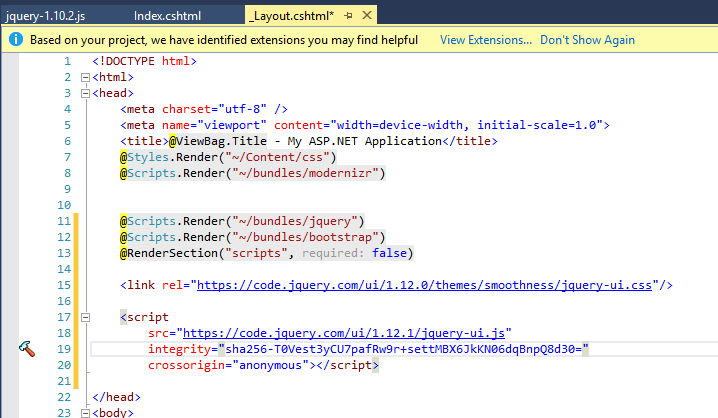
To fix this issue, you will have to move this code into the head section.

#img2#


Note that, .NET MVC doesn't have jQuery UI by default, if you want to use any jQuery UI function, don't forget to import jQuery UI.

The following example use jQuery UI from jQuery CDN.
#img3#


星期二, 八月 14, 2018

海外党如何看央视高尔夫网球频道

Tags: 央视高尔夫网球, 直播, 海外党, 
央视高尔夫网球频道的观看方法在这里


相关直播源链接在这里找


-~-~~-~~~-~~-~-

本频道旨在分享生活中各种小技巧, 如用小米盒子看国内视频, 如何使用KODI看电影等等. 点击进入我的频道: goo.gl/5tyxcf

🔷 订阅我的频道: goo.gl/KuF3bY
🔷 telegram电报群: t.me/fengsharegroup
🔷 我的博客: www.dengnz.com/blog
🔷 Facebook: www.facebook.com/fengnz

觉得我的视频对你帮助很大的话, 请我喝杯咖啡吧
微信赞赏码: goo.gl/uKoE8w
-~-~~-~~~-~~-~-

[翻墙] SSR服务器被恶意使用?

Tags: SSR, 谷歌云, Google Cloud,

今天查邮件的时候收到好几封来自谷歌的信, 写得可严重了。 说我的项目涉嫌挖掘加密货币, 我是真的冤枉呀。

这个SSR服务器我是分享给需要的人使用的, 我自己几乎就没有用过。 我也不懂有没有人拿它做非法的勾当。 不管怎么说, 这封信非常打击我分享免费SSR的积极性。


登入谷歌云查一下, 300块钱已经见底了。用得还是挺快的。


然后只能跟着邮件提示去上传信用卡和驾照, 几个小时后, 解锁了。

谷歌说这次就放过你了


我以后还是别分享自己的SSR服务器了, 哭!

[Youtube] [SSR 翻墙系列] 如何使用谷歌云 Google Cloud 搭建自己的 SSR 服务器保护隐私 [第六集]

Tags: SSR, 节点, 服务器, , GFW, 免费SSR, ShadowSocks, ShadowSocksR, 科学上网, 梯子, 谷歌云,

本教程是SSR翻墙系列的第六集
- [SSR 翻墙系列] ShadowSocksR Windows 10 客户端设置 [第一集] 已发布
- [SSR 翻墙系列] ShadowSocksR 安卓手机客户端设置 [第二集]
- [SSR 翻墙系列] ShadowSocksR SSR://链接, 订阅和二维码的使用 [第三集] 已发布
- [SSR 翻墙系列] ShadowSocksR 如何找到免费的 SSR 节点服务器 [第四集] 已发布
- [SSR 翻墙系列] 如何申请谷歌云 Google Cloud 帐号并免费获得 300 美金一年 [第五集]
- [SSR 翻墙系列] 如何使用谷歌云 Google Cloud 搭建自己的 SSR 服务器保护隐私 [第六集] 本集
- [SSR 翻墙系列] ShadowSocksR 安卓电视盒子客户端设置 [第七集] 制作中...
- [SSR 翻墙系列] ShadowSocksR 苹果手机客户端设置 [第八集] 计划中
- [SSR 翻墙系列] ShadowSocksR MAC OS客户端设置 [第九集] 计划中


未完待续…敬请期待
SSR翻墙系列播放列表


-~-~~-~~~-~~-~-

本频道旨在分享生活中各种小技巧, 如用小米盒子看国内视频, 如何使用KODI看电影等等. 点击进入我的频道: goo.gl/5tyxcf

🔷 订阅我的频道: goo.gl/KuF3bY
🔷 telegram电报群: t.me/fengsharegroup
🔷 我的博客: www.dengnz.com/blog

觉得我的视频对你帮助很大的话, 请我喝杯咖啡吧
微信赞赏码: goo.gl/uKoE8w
-~-~~-~~~-~~-~-


星期一, 八月 06, 2018

[Youtube] [SSR 翻墙系列] 如何申请谷歌云 Google Cloud 帐号并免费获得 300 美金一年 [第五集]


Tags: SSR, 节点, 服务器, 翻墙, GFW, 免费SSR, ShadowSocks, ShadowSocksR, 科学上网, 梯子, 谷歌云, 300美金, 300美元

本教程是SSR翻墙系列的第
集 - [SSR 翻墙系列] ShadowSocksR Windows 10 客户端设置 [第一集] 已发布
https://youtu.be/xMGBUHyWbps - [SSR 翻墙系列] ShadowSocksR 安卓手机客户端设置 [第二集] https://youtu.be/QTRi0k0HXQs - [SSR 翻墙系列] ShadowSocksR SSR://链接, 订阅和二维码的使用 [第三集] 已发布 https://youtu.be/kaPFnn0-wFQ - [SSR 翻墙系列] ShadowSocksR 如何找到免费的 SSR 节点服务器 [第四集] 已发布
- [SSR 翻墙系列] 如何申请谷歌云 Google Cloud 帐号并免费获得 300 美金一年 [第五集]
本集
- [SSR 翻墙系列] 如何使用谷歌云 Google Cloud 搭建自己的 SSR 服务器保护隐私 [第六集] 制作中 未完待续…敬请期待 SSR翻墙系列播放列表 https://www.youtube.com/playlist?list... 本视频里的资源页面 https://www.dengnz.com/2018/07/19/%E5... 如何搭建服务器可以看这两个视频教程. (翻墙VPS)谷歌云一年免费帐户申请+架设ShadowSocksR服务器+客户端设置 https://youtu.be/z_GPMoymipA (翻墙)Azure一条命令架设ShadowSocksR(SSR)服务器+客户端设置(Win10, 手机, 盒子) https://youtu.be/kboxUqf_cyM -~-~~-~~~-~~-~- 本频道旨在分享生活中各种小技巧, 如用小米盒子看国内视频, 如何使用KODI看电影等等. 点击进入我的频道: goo.gl/5tyxcf 🔷 订阅我的频道: goo.gl/KuF3bY 🔷 telegram电报群: t.me/fengsharegroup 🔷 我的博客: www.dengnz.com/blog 🔷 Facebook: www.facebook.com/fengnz 🔷 Twitter: https://twitter.com/fennng 觉得我的视频对你帮助很大的话, 请我喝杯咖啡吧 微信赞赏码: goo.gl/uKoE8w -~-~~-~~~-~~-~-

星期日, 八月 05, 2018

[Youtube] [SSR 翻墙系列] ShadowSocksR 如何找到免费的 SSR 节点服务器 [第四集]

本教程是SSR翻墙系列的第四集

- [SSR 翻墙系列] ShadowSocksR Windows 10 客户端设置 [第一集] 已发布
https://youtu.be/xMGBUHyWbps
- [SSR 翻墙系列] ShadowSocksR 安卓手机客户端设置 [第二集]
https://youtu.be/QTRi0k0HXQs
- [SSR 翻墙系列] ShadowSocksR SSR://链接, 订阅和二维码的使用 [第三集] 已发布
https://youtu.be/kaPFnn0-wFQ
- [SSR 翻墙系列] ShadowSocksR 如何找到免费的 SSR 节点服务器 [第四集] 本集

- [SSR 翻墙系列] 如何申请谷歌云 Google Cloud 帐号并免费获得 300 美金一年 [第五集] 制作中
- [SSR 翻墙系列] 如何使用谷歌云 Google Cloud 搭建自己的 SSR 服务器保护隐私 [第六集] 计划中

未完待续…敬请期待
SSR翻墙系列播放列表
https://www.youtube.com/playlist?list=PL3dZh-p-vVofYjkS4hBmeexblO5JUvCf2

本教程所使用的SSR服务器:

www.dengnz.com/%E5%85%8D%E8%B4%B9ssr%E6%9C%8D%E5%8A%A1%E5%99%A8/

如何搭建服务器可以看这两个视频教程.

(翻墙VPS)谷歌云一年免费帐户申请+架设ShadowSocksR服务器+客户端设置
https://youtu.be/z_GPMoymipA
(翻墙)Azure一条命令架设ShadowSocksR(SSR)服务器+客户端设置(Win10, 手机, 盒子)
https://youtu.be/kboxUqf_cyM

-~-~~-~~~-~~-~-

本频道旨在分享生活中各种小技巧, 如用小米盒子看国内视频, 如何使用KODI看电影等等. 点击进入我的频道: goo.gl/5tyxcf

🔷 订阅我的频道: goo.gl/KuF3bY
🔷 telegram电报群: t.me/fengsharegroup
🔷 我的博客: www.dengnz.com/blog
🔷 Facebook: www.facebook.com/fengnz
🔷 Twitter: https://twitter.com/fennng

觉得我的视频对你帮助很大的话, 请我喝杯咖啡吧
微信赞赏码: goo.gl/uKoE8w
-~-~~-~~~-~~-~-


Tags: SSR, 节点, 服务器, 翻墙, GFW, 免费SSR, ShadowSocks, ShadowSocksR, 科学上网, 梯子


星期四, 八月 02, 2018

[网络技术] How to capture tooltip popup balloon on Mac OS - A capture delay technique

Sometimes, you need to capture a screenshot with tooltip. But once your press the screen capture shortcut, the tooltip disappears. 


If you are on Mac OS, there is a build-in tool which you can use in this situation.

Run the following command and get your screen ready in 5 seconds. You can find your screen capture on your Desktop with the name screencapture.png.

[bash]
screencapture -T 5 -C ~/Desktop/screencapture.png
[/bash]

The "-T 5" argument set the time delay to 5 seconds. 
The "-C" argument ask the command to capture mouse as well.

Tags: capture tooltip, capture delay, Mac OS, tooltip popup, tooltip popup ballon, screencapture


星期二, 七月 31, 2018

[翻墙] 简要翻墙攻略

我之前出了几个翻墙视频, 发在了Youtube上。 不会翻墙的朋友可以去看看。


但是很显然, 这又是个先有鸡还是先有蛋的问题。 如果不能翻墙, 又怎么能看Youtube 视频呢?

所以, 我决定写一篇简要的翻墙攻略, 虽然没有视频, 但也是图文并茂, 简单易懂。

翻墙需要的工具:

1. 小飞机软件
2. 翻墙服务器登录信息

没了。 是的, 就需要这两个东西, 而且并不难找到。 

先到这里下载ShadowSocksR 的客户端, 也就是第一个所说的小飞机软件


以 Windows 为例, 安装完后打开,你会看到右下角有个小飞机的图标, 默认是白色的。

#img1#


#img2#


好了, 现在客户端已经准备好了。 先关掉吧, 等下要用再打开,不然可能不能上网哦。

接着我们要找服务器地址, 在这里随便找个可以用的SSR服务器


或者你可以试试我私人的SSR服务器


找一个二维码形式的节点, 打开小飞机, 然后右键点击小飞机, 点 Scan QRCode from Screen, 确保二维码显示在屏幕上。

#img3#


然后小飞机就会跳出来, 服务器的信息自动填好了。这个时候点OK你就翻墙成功了。试试谷歌能不能上去。
#img4#


如果上不去的话, 说明你找的服务器节点不行, 换一个试试。 如果这个时候不上了网, 先把小飞机关掉哦。

Tags: SSR, 翻墙, ShadowSocksR, 翻墙服务器, 科学上网,


[网络技术] Opera Browser can use Google Chrome's Extension

Opera was one of my favorite browsers in the past, I used it for a few years. I switched to Google Chrome for some reasons that I can't remember.

I've heard of that Opera has abandoned its in-house Presto rendering engine and switched to Webkit. I understand that it will support extension too.


#img1#


But I didn't notice that you can even install a Opera Add-on which can enable you to use all the extension on Google Chrome Store. That's Amazing.

#img2#


Once install this Add-on. Then you can browse Google chrome store as Google chrome does.

#img3#


You can install  your favorite Chrome extensions on Opera.

#img4#


You ask "Why don't you just use Google Chrome instead?"

Ok, good question. I don't have the answer. Maybe, maybe because my wife doesn't use opera :)

Tags: Opera, Google Chrome, Google Chrome Extension, Install Chrome Extension

星期一, 七月 30, 2018

[扒一扒] 最近有点老人痴呆了,居然把书包忘在公车上

%img#1%


今天坐公车的时候车上人很多, 只剩下老弱病小专用位和另一个已经有人坐着的位置。 下意识的避开专用位, 坐在唯一的那个位置上。 因为旁边坐着位大姐, 可能是她衣服穿得多,感觉位置特别小, 然后低头一看, 晕,这也是个老弱专用位。 反正都是专用位, 我就不用挤了, 于是我马上转移到另外两个宽松的专用位上。 旁边的大姐,我不是嫌弃你呀, 只是这个位置旁边有个好位置可以放书包。 为了证明我不是嫌弃那位大姐,我于是把书包放进座位旁边的缝隙里, 还真是个好位置。

然后悲剧了,我下车的时候就忘了书包这回事。 直到走了5,6分钟到公司9楼才意识到书包没有和我在一起。 我瞬间懵逼。 快速的思考一下现在车会在哪里, 想到我下车的地方是倒数第二站, 公车现在应该还在终点站, 幸运的是, 公车的终点站离倒数第二站不远,我跑过去只要3分钟。 我直冲下楼,往公车的终点站跑。 我边跑心里边捏把汗,终点站车那么多, 我哪知道是哪一辆。 希望那辆车还在显示原来的公车路线。 非常幸运,看着我身边经过好几辆公车后, 我远远的看到了我坐的那辆公车。 司机好像在上面整理什么东西, 我赶紧跑到车门口挥手。 司机打开门,我说了一句我包忘在车上了就往之前的座位找去。 没有! 包不见了!我手足无措的跟司机说可能不是这辆车。 然后司机一侧身,我看到我的包正在司机的座位上, 原来司机刚才一直在搜我的包, 可能想找到我的证件联系到我。汗!! 

我连连跟司机说谢谢,我一下车, 司机就把车上的指示改成 "Not in Service", 还好他刚才没改,不然我都找不到车了。。。难道以后坐车都要记车牌号码了吗?

还好最终是虚惊一场, 为自己的老年痴呆叹气, 也为自己快速的反应喝彩。

Tags: 坐公车
​​

[软件开发] .Net Core Web API Controller method return type

​With ASP.NET Core Web API, a controller class is used to handle HTTP requests. A controller class will use Route information to ​figure out which method to use to handle a particular request.  The return type of the method can be a specific type, an IActionResult or an ActionResult<T>. 

All these types can be wrapped into a Task or async Task. The question here is that how do you decide which return type to use for each method?

Specific type can be a primitive type (int) or complex data type (custom object). It will be sufficient when the method is only required to a specific type or a null. It wouldn't be a good idea to return a specific type when exception are handled. For example, returning a StatusCode "not found".

In this case, IActionResult type can be used.  IActionResult is a interface, when  IActionResult is used as return type, you can return all the objects that implement  IActionResult .  The abstract class ActionResult implements  IActionResult. There are a lot of build-in status code function returning  IActionResult,  such as  NotFound(), Accepted(), OK() and so on. You can even wrap specific type into OkObjectResult. return OK(product);


From ASP.NET Core2.1, ActionResult<T> can be used as returned type. Instead of 

[csharp]

return OK(product);

[/csharp]

A easier way is introduced.

[csharp]

return product;

[/csharp]


If you don't need to use await, don't use await and neither async. If await is used, the return type must be void or Task.

When do you need to use Task<> return type? When the controller is just pass through an Task return type. For example:

[csharp]

[HttpGet]
        public Task<IEnumerable<OrganizationEntity>> Get()
        {
            return GetOrganizationsInternal();
        }
[/csharp]

When do you need to use async Task<> return type? When you need to wait a async task. For example:


[csharp]
[HttpGet]
public async Task<UserPermission> Permissions()
{

    var user = await _userRepository.GetUserByName(Request.HttpContext.User.Identity.Name);
    if (user != null)
    {
        // Do something
        return GetPermissions(user);
    }
    ....
}


[/csharp]

In this example, user info is needed before getting user permissions. So await is used to get user result.  To use await, method must be a async method.  The method GetPermissions(user) will return user's permission, which is not a Task type, it's a UserPermission type. Because this is a async method, the UserPermission type will be wrapped into a Task automatically. Remember, if it's a async method, your returned object is a specific type, not a Task.

In Web API, each HTTP request is served by a thread from the thread pool. The controller methods are already called by different thread, what's the reason to make the return type Task or async Task?

Before answering this question,  we need to understand how threads in the thread pool works. Keep in mind, the number of threads in the thread pool is limited. Let's assume that we have only two threads in the thread pool.  If there are two time-consuming requests are served by these two thread, the 3rd requests will be sit in the queue and resulting a timeout from the client side. By using an async Task, after the thread is await a time-consuming async call in the method. The thread is pulled back to the thread pool and can be used to serve other requests. When the time-consuming async call finished, a thread will be allocate back to the awaiting position to continue executing. This way extends the scalability of the server. Note that the time-consuming task should not be a CPU intensive task, otherwise, it may not help that much. A time-consuming task typically a download from a slow network doesn't need much CPU time should be made as a async call to free up threads from thread pool.

Also, a async Task can speedup the execution when a call is depends on multiple time-consuming tasks. For example, a method needs to download 3 files to process the output, then 3 async download methods are called. This 3 files can be downloaded in the same time, during awaiting this 3 results, the method thread can process other code in this method or return back to the thread pool to server other requests. Without the async keywords, you can't  use await to wait the downloading files, you have to download the file one by one. Note that you can still use .Result() method to get the result of async method, await (WaitAll and etc.) is not the only way to get the result. But await is the only way you can wait for multi async methods. This is a big difference between await and .Result(), check the following example.


[csharp]
[HttpGet]
public async Task DownloadAll()
{

    //The following code will only take the longest time of d1, d2 and d3.
    var d1 = download1();
    var d2 = download2();
    var d3 = download3();

    var d1Result = await d1;
    var d2Result =  await d2;
    var d3Result =  await d3;


    //The following code will take the the sum of time taken by d1, d2 and d3
    d1Result = download1().Result();
    d2Result  = download2().Result();
    d3Result  = download3().Result();

    ...

}


[/csharp]


Reference:


​Tags: Web API, Controller, Action return type, async, thread, task, return type,  ActionResult, IActionResult

其它博客地址

此博客的同步博客地址: http://fengnz.wordpress.com
这里进入我的MSN SPACE.